EVERYDAY AI
Stop explaining the same task to AI: turn it into a reusable business playbook
Give your team a shared way to prepare and check recurring work, with clear sources, responsibilities and a focused pilot.

Your team prepares the weekly report on time, but the management meeting still starts with the same corrections. Sales has counted confirmed orders. Finance has counted invoices. An unfinished action has disappeared, and the explanation for a decline needs checking.
AI may have helped each person prepare their section faster. The team still has to agree what the report means and how it should be checked.
Now someone else covers the report. They inherit the files, but the reasons behind the usual corrections remain with the colleague who is away.
How do you make the team's knowledge and agreed way of working available whenever the task changes hands?
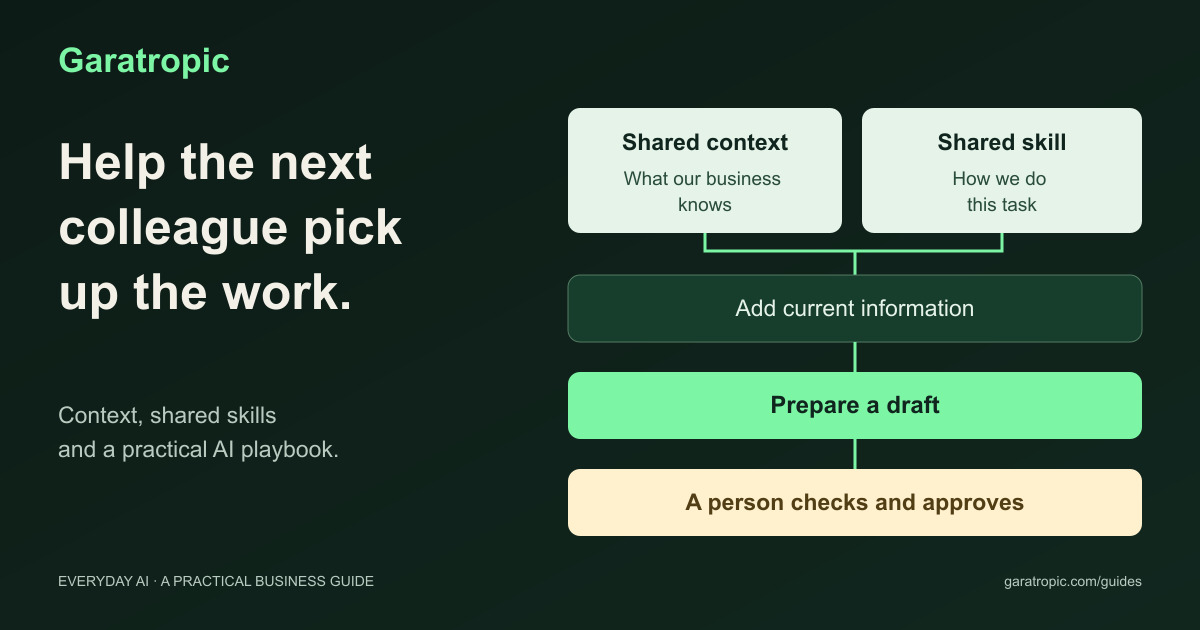
I would start with one recurring process and capture the background, method and decisions that people keep having to explain. An AI playbook brings those together so staff and their assistants can prepare work to an agreed standard, using current information and clear human review.
This is a practical continuation of where your business's AI advantage comes from: putting business knowledge to work in a way the team can maintain.
The management answer
- Choose one recurring process where inconsistent preparation or difficult handovers create a business cost.
- Agree the business knowledge and current records the task depends on.
- Capture the method, checks and limits in reusable instructions.
- Assign responsibility for information, review and exceptions.
- Test whether another colleague can produce useful work with less searching, explanation and correction.
The first investment is agreeing how the work should run. Your existing software may already provide a suitable place to apply those instructions.
What shared context and shared skills mean
Context is the background needed to understand the task. It includes what the business does, how it defines important measures, earlier decisions and the circumstances of the current request.
Shared context is the approved background that authorised colleagues and their AI tools can use across tasks. For the report, that might include the agreed meaning of “confirmed orders”, the targets and why management tracks them. Give that information an owner and a review date.
A skill is a reusable set of instructions for a particular task. A shared skill gives the team access to the agreed method: which information to use, what to prepare, which checks matter and when to ask a person. Some tools package templates and supporting files with those instructions.
For our fictional distributor, the pieces have different jobs:
| Piece | Business question it answers | Weekly-report example |
|---|---|---|
| Shared context | What does our business mean and require? | Agreed measure definitions, targets and reporting rules |
| Shared skill | How should this task be prepared and checked? | Compare figures, flag gaps and carry forward open actions |
| Current information | What happened in this reporting period? | This week's figures, explanations and action updates |
| Human responsibility | Who maintains the facts and makes the decisions? | Named source owners and a manager who reviews the draft |
The same definitions can support several reports without being rewritten for each one. Each task can then have its own method. This helps a colleague take over using the agreed background while still checking what has changed.
The relevant information must be supplied or retrieved when the task runs. A shared skill does not automatically give everyone access to every record, and it does not provide the current stock position simply because last month's catalogue is attached.
Microsoft's 30 October 2026 Copilot update describes reusable skills for capturing working instructions and expertise, with further capabilities rolling out in November. The management opportunity is to make a useful method available across the team and judge whether the work improves. Read Microsoft's update.
Put one playbook to work
1. Choose a process and define the improvement
For the distributor, the aim is a weekly report that helps managers identify changes, resolve open questions and assign action. The report should remain understandable when the usual preparer is unavailable.
Follow a recent reporting cycle with the people involved. Where did they search, ask for an explanation, retype information or correct a draft? Record the preparation and checking effort before changing the method.
Define success in those terms. A shorter report is useful only if management can still identify the decisions that matter. Our weekly management report guide examines what the finished report should contain.
2. Agree the business context and its owners
Identify the information that has to be dependable for this task. In the example, finance and operations need to agree the measure definitions, reporting period, targets and source of each figure.
Keep current figures separate from reusable background. Definitions may remain valid for months; this week's orders and open actions change with every report. Mark an example report with its date so its figures and explanations cannot quietly become current facts.
Name the person who resolves disagreements. If two branches use different definitions of “sales”, the business needs to settle that difference before AI combines the figures.
3. Capture the method your reviewers already apply
Take a reviewed report and ask which corrections recur. “Make this more useful” leaves the standard unclear. “Keep every open action with its responsible person and due date” describes work the team can repeat.
The distributor's instructions should require a draft that compares the agreed measures, preserves the source of important figures, distinguishes facts from possible explanations and keeps unanswered questions visible. They should say who reviews the report and which decisions remain with management.
Review the method with the people doing the work. An experienced colleague may know why a seemingly unnecessary check exists. Capture that reason before removing the check or turning it into a rule applied everywhere.
4. Decide what is shared and what remains controlled
Give colleagues the information needed for their part of the process. An operations report may need agreed staff-cost totals without exposing individual pay records. Decide who may use the shared method, who can edit it and who maintains the underlying information.
Also distinguish preparing a report from circulating it or changing a business record. Those actions have different consequences. If the assistant can send messages or update systems, its software permissions need to enforce the limits management has agreed.
Plan for exceptions. A missing source should leave a visible question and someone responsible for resolving it. A disagreement between two records should reach the person with authority to decide which one applies.
5. Test the handover as well as the draft
Have another colleague use the playbook without relying on the original preparer's private chat history. Check whether they can find the approved background, identify the current reporting period and understand what still needs review.
Use both ordinary work and awkward cases: a late branch submission, an unsupported explanation, an overdue action or a record the colleague is not permitted to see. A useful process makes those gaps visible and assigns a next step.
Compare preparation, checking, correction and information-maintenance effort with the current process. Ask whether management receives a more dependable basis for decisions. Expand when the quality and total effort justify it; revise the approach when the checking burden has simply moved to someone else.
Where Gemini, Codex and Claude Code fit
Gemini can provide a reusable helper around work staff already do in documents and spreadsheets. Gems support saved instructions and reference files, and can be shared with other people. Google is transitioning Gems to skills, starting with personal accounts in November 2026 and work and school accounts in 2027. Features and sharing differ during that transition. Check the account your business actually uses. Google's transition guidance.
Codex and Claude Code can help carry out work across files and software tools. With suitable setup and permissions, an assistant could use approved exports and an established calculation to prepare the report file. A person still checks the result. This route can be useful when repeated preparation warrants technical support and someone can maintain it. Codex overview and Claude Code overview.
Choose the arrangement around the process, staff and support available. Giving an assistant more access creates responsibilities for the business; it is worth doing when the completed work provides enough benefit to justify them.
Give your team a concrete brief
The example below gives the person responsible for setup something to work with. It uses fictional information and separates the business background, reusable method and current reporting period.
Download the three documents individually:
-
Business background
— definitions, reporting rules and the person checking the report. -
Report preparation instructions
— the method and checks to apply. -
One week's figures and actions
— the information for a sample report.
You can also download all three as a ZIP. The documents are ordinary text files that can be read and edited. Adapt them to the process your team agrees before introducing real business records.
For this fictional sample, the reviewer should expect the draft to identify:
- confirmed orders worth 4.6 million Kenyan shillings (KES), below the KES 5 million target;
- on-time delivery of 91%, below the 95% target;
- missing explanations for those changes;
- action A01 as open and overdue by the report's closing date of 1 November; and
- action A02 as open with no responsible person assigned.
These checks give the team a common standard for discussing the draft. If the assistant describes the order value as cash received, the error matters even when the summary sounds polished.
Optional implementation notes
The person setting up the helper can use the instructions below. The management decisions about sources, responsibilities, access and acceptable results should already be agreed.
Show setup steps for Gemini, Codex and Claude Code
Save the method in Gemini
Use the option visible in your approved account. Google is changing Gems to skills, so colleagues may see different menus during the transition.
For Gems:
- Open Gemini on the web, choose Gems, then New Gem. If Gems is hidden, check Settings and help.
- Name it Weekly report helper. Open
report-instructions.txt, copy its text and paste that text into the Gem's instructions. - Under Knowledge, choose Add files, attach
business-context.txtand save. Keepsample-week.txtfor the test chat.
Google's Gem setup guide describes these controls.
For Skills:
- Open Customize → Skills. Look under More if Customize is hidden.
- Choose Create → Create manually. Name the skill
weekly-reportand describe it as “Prepare a weekly operations report from supplied business background and current figures.” - Open
report-instructions.txt, copy its text and paste it into Instructions. Attachbusiness-context.txtwith Add if available, then choose Create. Otherwise attach the background file with each report request.
Google's skill setup guide lists its account requirements, including being 18 or over and having Keep Activity on. Use your organisation's approved settings for work information.
Run and review the sample
Open the Gem, or select weekly-report in a Gemini chat using / or the newer @ shortcut. Attach sample-week.txt, plus the background file if it was not saved with the helper. Ask:
Prepare a weekly operations report using the saved report instructions,
business-context.txt and sample-week.txt.

First state the reporting period and the records used. Then give me a
short summary, important changes, open actions and questions for the
manager. Keep missing explanations visible. Prepare a draft for review.
Compare the draft with the five checks above. Correct the saved instructions when needed, then repeat the test in a fresh chat. A correction left only in the old conversation may not help another colleague.
For a Gem, use Share to invite an authorised colleague. Choose Viewer if they only need to use it. They can see the instructions and uploaded material, so check what is attached before sharing. Google's sharing guide explains the access levels.
Where skill sharing is unavailable, keep an approved copy of the background and method in the team's shared location so another colleague can recreate the helper. Do not assume a Gem's Share control is available for every skill during the transition.
Set up the same method in Codex or Claude Code
If your team already uses one of these tools, open a dedicated folder for this work and put the three documents directly in that folder. Ask the tool to create a reusable skill saved with this project. In Codex, its built-in $skill-creator can help with that task.
Create a project skill named weekly-report from report-instructions.txt.
Use business-context.txt in this folder for the business background.
Require a separate file with the current week's information for each run.

Keep the skill limited to preparing a weekly report draft. Start with
instructions only. Show me the saved instructions and their location
before running the task. Leave the three original documents unchanged.
Check that the saved instructions refer to the business background, require current figures and keep review with the operations manager. Local project skills use .agents/skills/weekly-report/SKILL.md in Codex and .claude/skills/weekly-report/SKILL.md in Claude Code; the tool should create those files for you. See OpenAI's skill instructions and Claude Code's skill guide.
In Codex's text-command window, use /skills or $weekly-report to select the skill. In Claude Code, use /weekly-report. Ask it to read sample-week.txt and save the draft as output/weekly-report.md, leaving the originals unchanged. Open the draft, apply the sample checks and repeat in a fresh chat using the same project.
An implementation colleague can help share the reviewed project files. More complex spreadsheets may need suitable file-handling tools, maintained calculations and agreed access. A saved skill does not provide those connections or schedule the report on its own. Claude Code's project-context guidance explains how shared background can accompany task instructions.
Keep the shared method useful
Give the playbook and important sources named owners. If management changes a measure definition, update the shared definition and check the reports, instructions and examples that use it. Retire old versions so colleagues can identify the current guidance.
When the same correction keeps appearing, investigate its cause. The method may be unclear, the record may be incomplete or the assistant may be unsuitable for that part of the work. Adding another instruction will not resolve every problem.
Keep a few representative cases to check after a significant change to the tool or method. Continue measuring review and maintenance alongside preparation. Our AI-literacy guide explains why a collection of saved prompts alone is not a complete business process.
Make the next handover more dependable
Return to the weekly report. The practical improvement is a colleague who can use agreed definitions, find current facts, prepare the next draft and recognise which decisions need management.
The business retains the knowledge and responsibility. AI helps apply a method the team understands and can challenge.
Choose one process that depends heavily on repeated explanations or a particular employee's memory. Agree what must be shared, who maintains it and what a successful handover looks like. Then test it with the people doing the work.
Research and helpful links
- Microsoft Copilot October 2026 update
- Google guidance on the transition from Gems to skills
- Google guide to creating and using skills
- Google guidance on sharing Gems and their files
- OpenAI guidance on reusable skills
- Codex CLI overview
- Claude Code overview
- Claude Code skill creation and sharing
- Claude Code project instructions and memory
Product guidance checked on 3 November 2026. Availability, sharing and supported features depend on the product, account and organisation's settings.